Let your seats pick the spot
- Try the sub where it is now, a spot along the front wall and, if you have one, a front corner.
- Play the same bass-heavy track from every seat you use and keep the spot with the fewest booming or missing notes.
- A corner can make bass louder without making it more even.
- Rerun your room calibration once you've picked the spot, then listen again.
- Get help moving a heavy sub, and keep it on the floor while you test.
When a bass line thumps in one seat and half disappears in the next, look at where the sub sits before you blame the sub. Sound from it bounces around your room and lands differently on each seat. We'd move the sub before touching any settings, because where it sits and where you sit decide which notes pile up and which cancel out.
Start with a usable spot along the front wall, then compare it with a front corner and the sub's current position. Let your seats decide: a corner may sound louder, but the better spot has fewer distracting peaks and gaps where you listen.
Decide who you're tuning for before you move anything. If only one seat matters, set things up for that seat. If the sofa is regularly full, aim for the best compromise across it.
Why a note can boom in one seat and fade in another
At your seat, sound coming straight from the sub mixes with sound bouncing off the walls, floor and ceiling. Those can add up or cancel each other out, and the result is a messy pattern of direct and reflected standing waves across the room.
Room resonances add their own peaks and dips, and how much you hear them depends on both where the sub is and where you sit. That's why two seats a few feet apart can hear very different bass.
| What you hear | Likely reason | What to try |
|---|---|---|
| Notes boom or vanish depending on the seat | Direct and reflected sound adding up or canceling at that seat | Compare a few sub spots from each seat |
| Bass got bigger and heavier in a corner | A corner can make the sub sound louder and exaggerate peaks | Compare it with a spot along the front wall |
| Bass sounds thin where the sub and speakers hand off | Phase not aligned at the crossover | Check phase and crossover after you calibrate |
| Bass changed after you moved the sub | Your room calibration was set up for the old spot | Rerun calibration in the new spot |
| No spot works for every seat | One sub gives the least consistent bass across a room | Try other seats, then consider a second sub |
Use placement to fix the biggest gaps before you reach for EQ. EQ can tame some peaks, but boosting a deep dip can take so much amplifier power that the amp clips and the sound gets worse. And when a wall reflection causes the cancellation, turning the sub up turns the reflection up too.
Pick spots you can safely keep
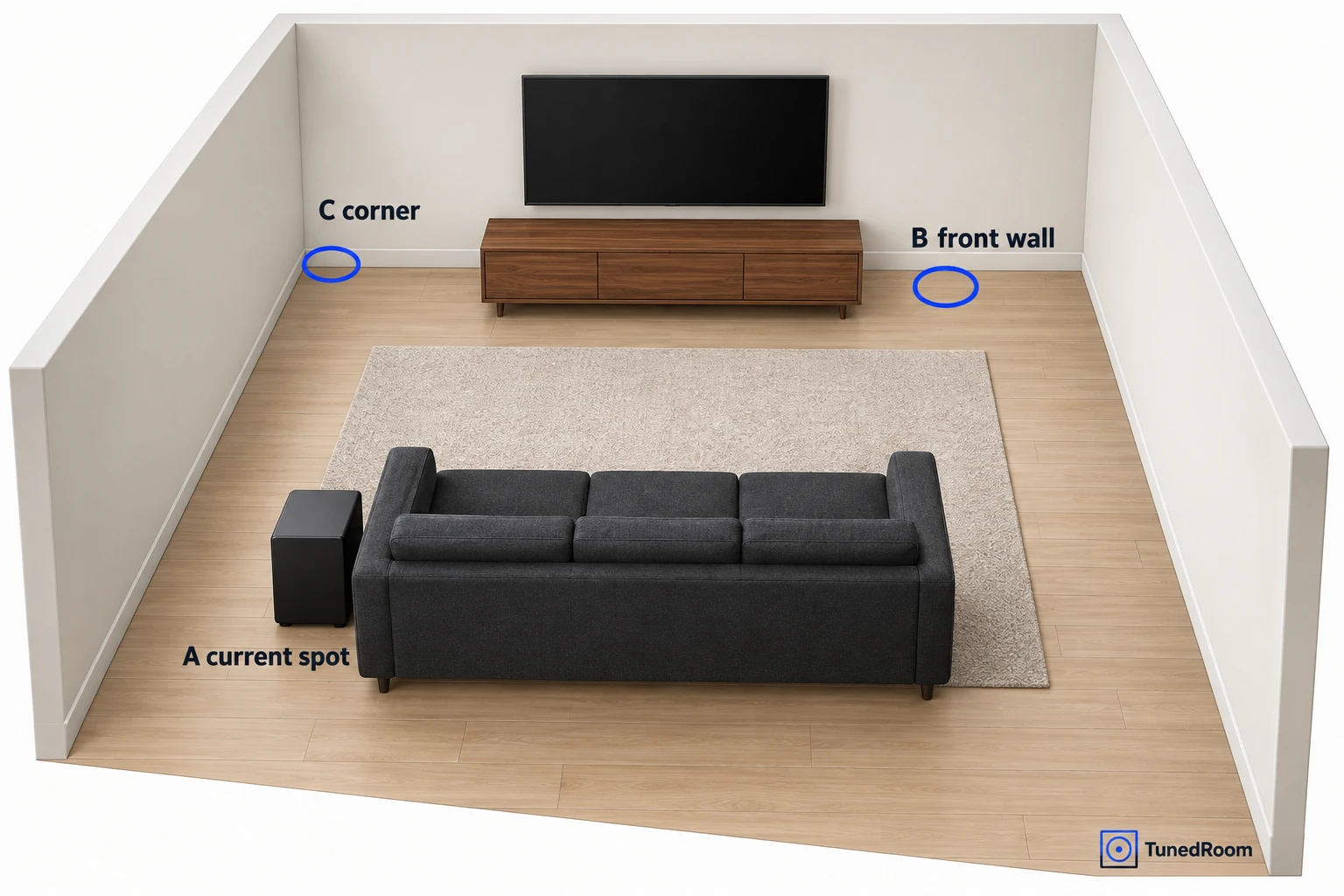
Call the sub's current spot A, a practical front-wall spot B, and a corner C if you have one. Keep walkways clear and stick to spots that meet your sub's installation instructions. Cross off any spot that needs a stretched cable or gets in the way every day.
Check your sub's orientation, ventilation and clearance rules before you move it. For example, the Yamaha NS-SW100 and NS-SW050 need at least 20 cm (about 8 inches) above, behind and on both sides because the built-in amplifier gives off heat from the rear panel. They must never sit with the rear panel facing down. Check Yamaha's installation and handling instructions (opens in a new tab) before moving either model.
Stop playback, then shut down and disconnect your gear the way its instructions say before each move. On the Yamaha NS-SW100 and NS-SW050, unplug the power plug and the wires to other equipment first. Never pull on the wires themselves or carry the sub by its port, which can hurt you or damage it.
When you reconnect, keep the sub and your other audio and video gear unplugged until every connection is complete and secure, then plug the AC power back in. If you're unsure which cable goes where, our walkthrough on hooking up a subwoofer covers the RCA and speaker-level options.
Compare each spot the same way
This first pass narrows the field, and you'll judge the likely winner after calibration. Keep the music and settings the same throughout, so the only thing changing is where the sub sits.
- Pick your main seat and the other seats you use regularly. If only the main seat matters, let it decide; otherwise, compare the whole sofa and aim for the best compromise.
- Choose a song you know with a repeating bass line and note the timestamp, plus a movie scene you know if you watch films on this system. Write down the volume and any sub level, phase, crossover and EQ settings. If you have no movie scene to compare, use the song for every spot.
- With the sub at A, listen from each seat on your list at a comfortable volume. Jot down which moments boom, fade or drown out everything else. If a difference is hard to hear, replay the same passage before moving the sub.
- Stop playback, move and reconnect the sub, then play the same passages with the same settings at B, and at C if it's usable. Record what changes at each seat. If a spot is unsafe or impractical, cross it off and compare the remaining spots.
- Line up your notes seat by seat. Keep the spot with the fewest distracting booms and dropouts at your priority seats. If two are close, keep the more practical, safer spot, or carry both into calibration.
Your notes reflect your current settings, which were set up for the old spot. Once you've got a likely permanent spot, calibrate and replay the same passages from the same seats. If you kept two finalists, calibrate each one before you make the final call.
Try the subwoofer crawl
The crawl flips the usual setup around to find a promising spot for your main seat. The sub goes where you sit, and you listen around the room with your head down near knee height, which is where the name comes from. For more detail, use these subwoofer crawl instructions (opens in a new tab).
- Put the sub on the floor at or near your main seat, following its moving and installation instructions. Get help if it's big or heavy, and skip the crawl if there's no safe spot to set it down for a while.
- Loop a familiar soundtrack with a repeating bass line at a comfortable volume.
- Go to each spot where the sub could actually live and listen with your head at or near knee height. The spot where the bass sounds most balanced is your candidate.
- Move the sub to that candidate spot and listen from your main seat and the other seats you care about.
Because the crawl starts from one seat, that last check from the other seats tells you whether the spot works for the whole sofa. If it doesn't, the side-by-side comparison of A, B and C is the better tool for a shared couch.
Measure it if your ears can't decide
We'd start with the listening comparison and bring in measurements only if it leaves you stuck, since measuring takes extra gear. It pays off when you want to see exactly which frequencies are the problem or compare two close spots.
The software side costs nothing. You can download Room EQ Wizard (opens in a new tab), free measurement software for rooms, speakers and subwoofers, but you still need hardware. One practical setup is a computer, a calibrated USB microphone, an audio connection from the computer to your system and a tripod to hold the mic steady.
Calibrated mics aren't interchangeable. A miniDSP UMIK-1, for instance, is individually calibrated and ships with its own calibration file, so load the file that belongs to your mic.
Put the mic on the tripod at seated ear height. If it points up, load its 90-degree calibration file. Work through REW's equipment setup before you measure, then measure each priority seat with the sub at each spot.
Keep the question narrow: which spot cuts the biggest peaks and gaps across the seats that matter? Measure every one of those seats, because a graph from one mic position describes only that position.
When the sub has only one place to go
We'd try other seats before buying another sub. Try different sofa cushions, or move a chair forward or back if the room allows, because a small change in where you sit can move you out of a peak or dip.
If there's some room to slide the sub along the wall, try another usable position and listen after the move. Keep the required clearance at every stop.
Keep the sub the way it's meant to stand. A Sonos Sub Mini goes upright near the speaker it's paired with, and against a wall or furniture it needs enough clearance for air to move through its center tunnel, so don't lay it down even when space is tight. For other Sonos subs, our Sonos subwoofer placement walkthrough covers floor spots, ventilation and under-furniture clearance.
If no single spot gives you good bass across your seats, you may be up against the limits of one sub. A single sub gives the least consistent bass across a room. A second sub, placed some distance from the first, is worth considering. Well-placed multiple subs can make the bass much more consistent across the listening area, and they still need careful placement and setup to get there.
Plan where they go and how they're set up together. With Revel B112V2 or B110V2 subs, set each one's PEQ separately, then adjust levels and crossovers together so they blend with the main speakers. Those PEQ controls need proper measurement gear, so contact a Revel dealer or an installer if you'd rather have that part done for you.
If the bass still booms or fades across your priority seats after you've compared usable spots and recalibrated, ask an installer to measure the response at those seats and check the phase at the crossover. Tell them which spots and seats you tried, which passages changed, and the settings you recorded. Ask what the visit includes and what it costs before booking.
Calibrate, then listen from every seat
With the sub in its new spot, run your system's room calibration before any fine-tuning, using the steps for your receiver and sub. The old calibration was built around the old spot.
After moving a Sonos speaker, retune Trueplay. In the current Sonos app on iOS, open Settings, choose the room, then select Sound > Trueplay > Retune. If you use the S1 Controller on iOS or an Android device, retune your Sonos speakers (opens in a new tab) using the instructions for your app and product. Android retuning requires a product that supports quick tuning.
Then use the controls your gear has. If the bass still sounds weak around the crossover, where the sub and main speakers hand off to each other, go through their phase-alignment steps. Misaligned phase can cut the sound level right there, so set phase and crossover for your own system instead of copying someone else's numbers.
If you're not sure whether your receiver or the sub should handle the crossover, our guide to setting the crossover on your receiver explains the choice.
Play your comparison passages again at every priority seat. You're listening for bass that blends with the speakers and doesn't keep booming, fading or drawing attention to the cabinet.
If the balance is good but the bass is too strong overall, turn the sub level down using your equipment's controls. If certain notes still vanish at certain seats, go back to placement or seating before you try a big EQ boost.
Common subwoofer placement questions
What if the front wall has no usable floor space?
Compare the sub's current spot with another wall spot that keeps walkways clear, leaves the required clearance and doesn't stretch a cable. Use the same passages and seats for both.
Can I put the sub behind furniture?
Check your model's orientation and clearance rules first. A Sonos Sub Mini stays upright, and furniture must leave room for air to move through its center tunnel.
What if calibration changes which spot sounds better?
Calibrate each finalist in turn, then replay the same passages from the same seats. Keep the spot that sounds more even after calibration.
Where should a second sub go?
Try a spot some distance from the first sub, then check the seats again. The subs still need their levels and crossovers set together.
More in this category