The corner decision for Sub 4
- For Sub 4, a corner is an allowed floor location. A wall or a spot behind, under, or next to furniture is allowed too.
- Pick a spot that keeps the acoustic slot and ventilation open, the cable protected, and the power plug within reach.
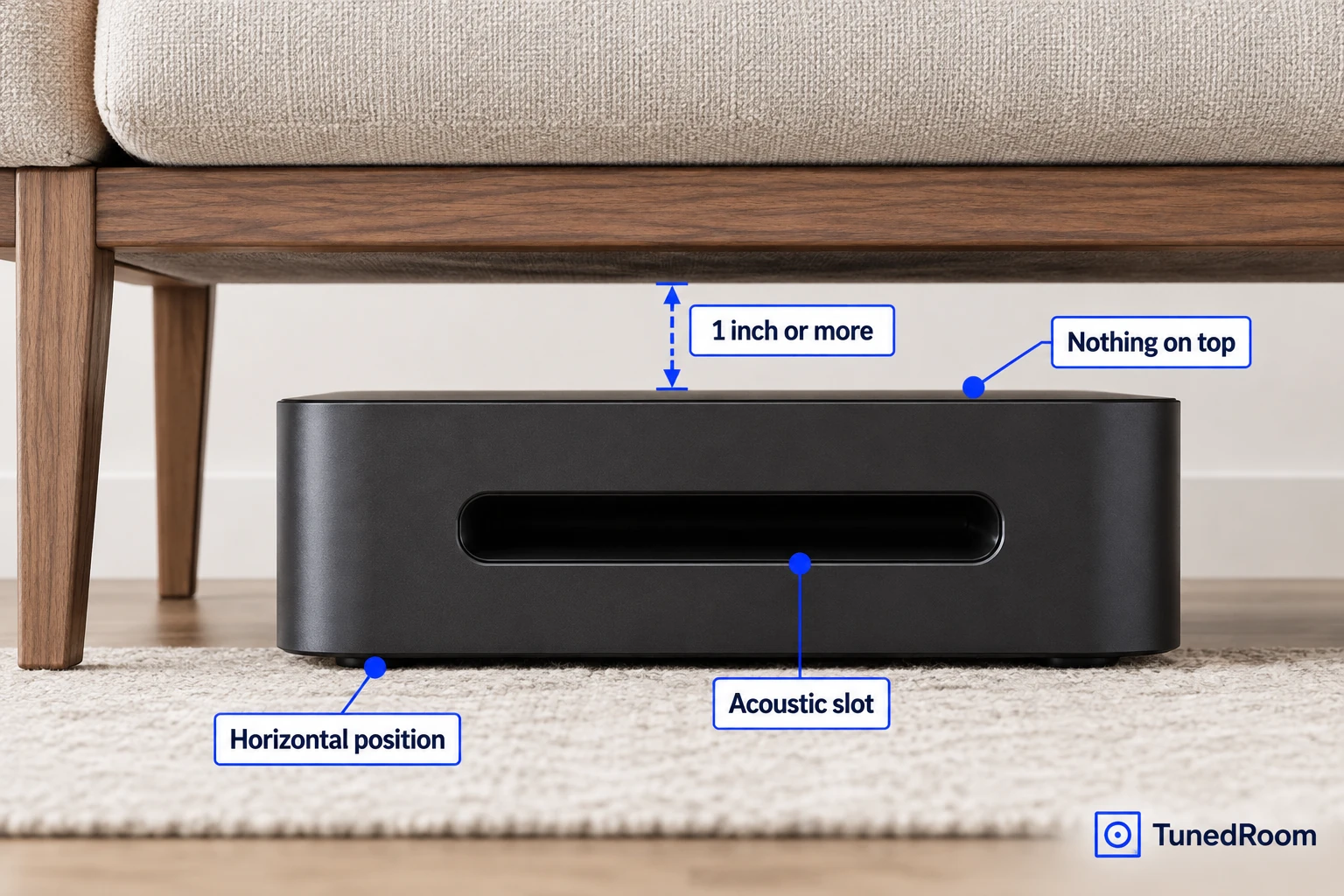
- If Sub 4 lies horizontally under furniture, put nothing on it and leave at least 1 inch of space above it.
- After reconnecting a moved Sub, wait for a solid white status light before adjusting its level.
We'd try the nearest corner that passes every physical check, because Sonos permits corner placement for Sub 4 without favoring one corner over another. That permission does not identify an acoustically best corner, so let clearance, power access, heat, and water exposure make the first decision, then set the bass level to your preference.
Sub 4 is designed to sit on the floor on any kind of floor surface. It can stand vertically or lie horizontally, giving you several workable ways to fit it around the room.
Know which model these rules cover
The detailed positioning procedure here is for Sub 4. Sonos permits this model in a corner, against a wall, or behind, under, or next to furniture, and it may be vertical or horizontal.
The broader Sonos guidance says Sub can tuck under a couch or TV stand, while Sub Mini can sit anywhere within reach of a power socket because the connection to the Sonos system is wireless. Keep that general guidance separate from the Sub 4 details below, including its lifting method, orientations, opening rules, and 1-inch clearance.
Make sure the spot physically works
A usable corner needs more than enough floor space for the cabinet. At least one side of the acoustic slot must remain unobstructed, and if Sub 4 stands vertically against a wall, its front opening must stay clear.
A horizontal position can work under furniture, including a sofa. Sonos's Sub 4 placement guidance (opens in a new tab) says to put nothing on top of the unit and leave at least 1 inch of clearance along its top when it sits under furniture.
The same location must leave every ventilation opening uncovered. Keep Sub 4 away from radiators, heat registers, stoves, and other equipment that produces heat, because a convenient gap beside furniture is unsuitable if it also traps heat or blocks ventilation.
A corner that fails any of these checks is out. Move to another allowed floor position, such as an open stretch of wall or a suitable place beside or under furniture, while preserving the same opening and clearance rules.
Lift and position it safely
Clear the route before you lift. Use the acoustic slot as the handle for Sub 4, bend your knees while lifting, and lower the unit directly onto the floor at the chosen spot.
- Set Sub 4 vertically or horizontally in the chosen floor position. When it is vertical against a wall, finish with the front opening clear.
- Look at both sides of the acoustic slot and leave at least one side unobstructed. The slot should not be boxed in by the wall or furniture.
- If the unit is horizontal, remove everything from its top. When it is under furniture, confirm at least 1 inch of open space above it.
- Check that no ventilation opening is covered and that the finished position is away from heat and water. Move it again if any condition fails.
Permanent felt feet are an option when Sub 4 will remain horizontal. They don't replace the requirement to keep its top clear and preserve the stated clearance under furniture.
Give the cable and plug a safe route
Plan the power route before pushing the Sub into its final position. Run the cable where people won't walk on it and furniture won't pinch it, paying particular attention at the plug, the outlet, and the point where the cable leaves the unit.
Leave the mains plug readily accessible so you can disconnect the equipment. If a sofa, cabinet, or other heavy furniture would trap the plug after the Sub is in place, choose a different position or route before connecting power.
Before switching your attention to the app, inspect the whole placement once more. The plug should be reachable, the cable unpinched, the ventilation uncovered, and the acoustic slot and any required space above the unit clear.
Adjust the bass after moving it
If you unplugged the Sub and connected it in another spot, watch its status light before changing anything. Wait until the light stops flashing and turns solid white, which tells you it is ready for the settings change.
- Open the Sonos app and go to Settings. You should arrive at the settings screen.
- Select the product that already has the Sub added. Its product controls should open.
- Select Sub Audio. The Sub level control should now be available.
- Move the level slider up or down until the Sub matches your main speakers and suits your listening preference. The level you hear from your listening position is the result to judge.
The level slider raises or lowers Sub volume. Sonos also provides EQ and volume controls for matching bass to your listening preferences and acoustic environment, so this is where you make the basic sound adjustment after the physical placement is settled.
Questions that change your placement choice
Can Sub 4 stay in a corner?
Yes. A corner is one of the permitted floor locations for Sub 4, along with a wall and positions behind, under, or next to furniture. The corner still has to keep the required openings clear and provide safe power access.
Can Sub 4 go under a couch?
Yes. Sub 4 can lie horizontally under a sofa or other furniture. Put nothing on top, leave at least 1 inch of clearance above it, and keep at least one side of the acoustic slot unobstructed.
Can Sub 4 lie on its side?
Yes. Sub 4 may stand vertically or lie horizontally. Permanent felt feet are optional if you plan to keep it horizontal.
When can I adjust it after a move?
Wait until its status light stops flashing and turns solid white. Then open Settings in the Sonos app, select the product with the Sub, choose Sub Audio, and adjust the level slider.
If none of the available positions preserves ventilation, keeps the unit away from heat and water, protects the cable, and leaves the plug accessible, don't use those positions. Choose another permitted floor location that satisfies every condition before reconnecting Sub 4.
More in this category