From your source to the sound you hear
- Your phone or computer sends digital audio over a short-range Bluetooth radio link to a paired speaker.
- The speaker decodes that data, amplifies an electrical signal and moves air to make the sound you hear.
- Start by checking that the two devices can use the same audio profile. If sound breaks up as you move, try a clearer path between them.
If you’re choosing a speaker for a phone or computer, we’d check audio-profile compatibility before thinking about range, because the shared profile determines whether the devices can exchange sound. Once they can pair for audio, you can follow one path from the source, across the radio link and into the room.
How the two devices find each other
Turn on Bluetooth on both devices and put the speaker in pairing mode. That lets them discover each other over radio waves; complete the pair when they find each other, entering a PIN or code if you’re asked for one. The speaker’s pairing control depends on the speaker you have, so use its own instructions to find that control.
Keep the devices near each other while they pair. Bluetooth is a short-range link, and its usable distance depends on the products and their surroundings. After pairing, the source can send audio data wirelessly to the speaker.
Pairing establishes the connection between the two devices. It doesn’t change the route the sound takes inside the speaker: the radio link carries data, and the speaker turns that data into the sound you hear.
What makes a Bluetooth connection usable for music
A Bluetooth profile describes the kind of work a device can do over the connection. Both ends of the audio link need a profile they can use together. A Bluetooth game controller and a Bluetooth speaker have different jobs, which is why Bluetooth capability alone isn’t the useful compatibility check for listening.
A2DP, short for Advanced Audio Distribution Profile, is used for wireless audio in the speaker connections described here. Check that your source supports sending audio to the speaker and that the speaker can receive it through a compatible profile. Make that check for the actual wireless connection between those two devices.
The profile and the codec handle different parts of the job. The profile makes the devices usable together for audio; the codec prepares audio data for transmission and helps decode it at the speaker. If you later want to use more than one speaker, connecting multiple Bluetooth speakers covers that separate setup.
What crosses the radio link
After pairing, the source sends digital audio information through the air as short-range radio waves. The link carries information representing music or speech, not the pressure waves that reach your ears. Those waves are made at the speaker after the data arrives.
A codec compresses and decompresses the audio data so it can travel across the wireless link efficiently. The speaker’s Bluetooth receiver takes in the arriving data and decodes it. That decoding is the handoff between the radio connection and the speaker’s sound-producing parts.
Think of the source as the sender and the speaker as the receiver for this hop. That order helps when you’re checking compatibility: the question is whether these two ends can exchange audio over Bluetooth, before you consider what happens to the signal inside the speaker.
How the speaker turns data into sound
Inside the speaker, the decoded digital audio becomes an analog electrical signal. An amplifier boosts that signal before it reaches the driver. The radio portion of the journey has ended; the speaker now has to turn an electrical signal into movement.
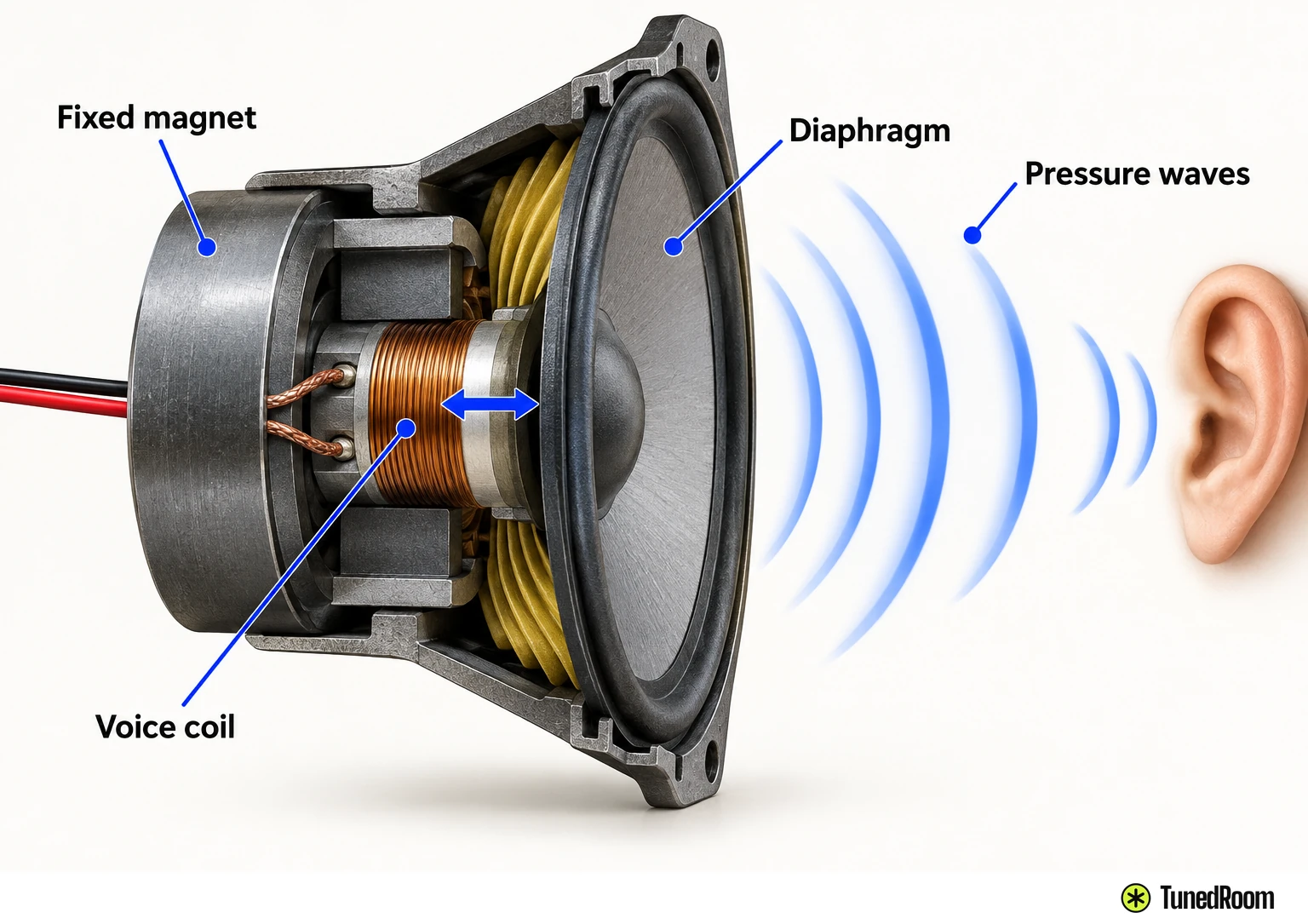
The amplified signal flows through a voice coil, a coil of wire positioned in the magnetic field of a fixed magnet. Electric current creates a magnetic field around the coil. Its interaction with the fixed magnet’s field moves the coil back and forth.
That movement drives the diaphragm, the light cone- or dome-shaped part attached to the coil. As the diaphragm moves, it pushes and pulls the surrounding air, creating pressure waves. They travel to your ears as the music or speech that started at the source.
Why a steady connection can still sound different
Codec compression helps send audio information efficiently over Bluetooth. It may also slightly reduce the quality of certain audio files. That possible change concerns the information carried by the link, even when the connection stays steady.
This is a different effect from sound breaking up as you move away from the speaker. Compression happens as part of preparing and decoding the audio data; dropouts can follow a weakened radio path. Knowing which part you’re hearing gives you a useful first move: consider the audio data when playback stays steady, and the path between devices when it cuts out.
A codec’s name tells you about a way of handling the data, while the sound reaching you has also passed through conversion, amplification and moving speaker parts. Listening at the speaker means hearing the result of that whole path, from digital information to pressure waves in the room.
What changes the distance you can use
Bluetooth range varies by product and Bluetooth classification, as well as by the space between the devices. If the sound starts breaking up as you move, bring the source closer to the speaker and listen again. A shorter, clearer route reduces the obstacles the radio signal has to cross.
Radio waves can pass through solid objects, but more obstructions can affect the signal. Material matters: wood, glass and plastic are friendlier to the link than metal, plaster and concrete. If a dense barrier sits between you and the speaker, moving the source into a more open position gives the signal a clearer path.
Your body can affect that path too, especially when it covers a device’s Bluetooth antenna. Try holding or placing the source where your body isn’t between it and the speaker. What matters for listening is whether the connection stays steady from the places you actually use.
Nearby wireless signals can overlap with Bluetooth and reduce its strength and range. Wi-Fi routers share the 2.4 GHz band, so a crowded wireless space can make the route harder for Bluetooth. Rain or humid air can also limit how well the signal travels. These factors change the radio link, while codec compression changes the audio data carried on it.
Where internet and Wi-Fi fit in
The Bluetooth link between a source and speaker doesn’t need an internet connection. The paired devices exchange audio directly over radio waves. That direct route is handy when your source is nearby and you want it to play through a speaker.
Wi-Fi speaker playback follows a different route: the speaker connects to an existing Wi-Fi network. That network route offers broader bandwidth and can support lossless streaming. Bluetooth is the direct device-to-speaker choice when that’s the route you want; Wi-Fi playback uses the network instead.
To check your Bluetooth setup, play audio from the paired source while the devices are near each other, then listen from the spot where you normally use the speaker. You should hear the audio through the speaker and hear it stay steady as you move within a workable range for those devices and surroundings.
More in this category